DeepSeek-R1 vs. Llama 3.3 (70B):在 DigitalOcean GenAI 平台上的 AI 聊天機器人實驗
前言
要打造一個好用的 AI 聊天機器人,選對 LLM 是關鍵。有些模型擅長深度推理,有些則更適合以檢索為主的回答。
為了比較這些差異,我們在 DigitalOcean 的 GenAI 平台上,分別用 DeepSeek-R1 和 Llama 3.3 (70B) 部署了兩個 AI 聊天機器人。我們用三個常見且貼近實務的新創相關問題來測試它們:
✅ Q1:要快速推出 SaaS,DigitalOcean 上最適合的產品有哪些?
✅ Q2:要達成產品市場契合度(product-market fit),最快、最精簡的設定是什麼?
✅ Q3:對新創來說,最具成本效益的基礎設施是什麼?
讀完這篇教學,你將會:
✔ 了解不同的 LLM 如何處理商業導向的任務
✔ 學會如何在 DigitalOcean 的 GenAI 平台上部署 AI 聊天機器人
✔ 掌握兼具成本效益與可擴展性的 AI 基礎設施要點
這份指南對想運用 LLM 聊天機器人來處理商業策略、基礎設施規劃與成本優化的創辦人、AI 工程師和 SaaS 開發者特別有幫助。
事前準備
開始之前,請確認你已具備以下條件:
- 一個可以使用 GenAI 平台的 DigitalOcean 帳號
- 對 **LLM 與檢索增強生成(Retrieval-Augmented Generation,RAG)**有基本認識
- 一份用於測試聊天機器人的知識庫(以 Markdown 或 HTML 結構化)
- 不需要自行架設任何基礎設施——DigitalOcean 的 GenAI 平台會自動處理部署
資料是關鍵:餵給聊天機器人正確的資訊
聊天機器人的表現,取決於它所依據的資料品質。在比較 DeepSeek-R1 和 Llama 3.3 (70B) 之前,我們需要一份高品質的知識庫(KB),讓它們能檢索到相關的答案。
用 DigitalOcean 的 GenAI 平台爬取資料
DigitalOcean 的 GenAI 平台內建了網頁爬蟲,讓使用者可以把外部網站的資料直接匯入聊天機器人的知識庫。
用 DigitalOcean 的 GenAI 平台爬取資料
DigitalOcean 的 GenAI 平台內建了網頁爬蟲,讓使用者可以把外部網站的資料直接匯入聊天機器人的知識庫。這能確保聊天機器人可以取得來自公開網站的相關且即時的資訊。
✅ 如何使用網頁爬蟲:
-
建立知識庫(Knowledge Base)
- 前往 GenAI 平台,建立一個新的知識庫(Knowledge Base)。
-
選擇資料來源
- 點選 「Select Data Source」,並從下拉選單中選擇 「URL for web crawling」。
-
輸入起始 URL
- 輸入你想爬取的網站 URL。
-
選擇爬取規則
- 選擇合適的爬取深度與策略:
- Scoped(範圍最窄)——只爬取起始 URL。
- URL and all linked pages in path(較窄)——爬取該 URL 路徑下所有連結的頁面。
- URL and all linked pages in domain(較廣)——爬取同一網域內的所有頁面。
- Subdomains(範圍最廣)——爬取所有子網域的頁面。
- 選擇合適的爬取深度與策略:
-
確認並新增資料來源
- 點選 「Add selected data source」 開始爬取。
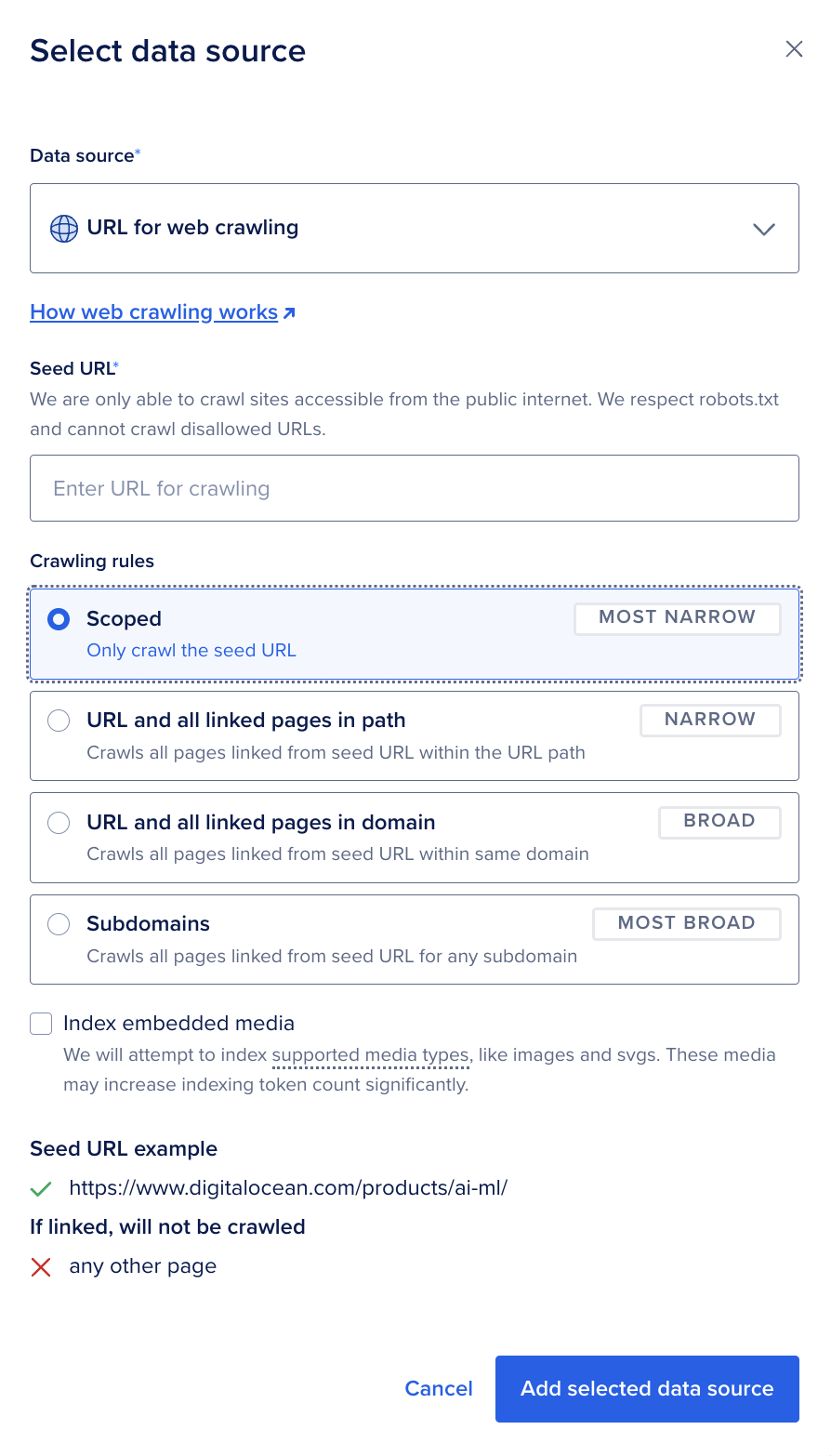
📌 新增後,DigitalOcean 會自動解析內容並建立索引,轉成 LLM 友善的格式,方便聊天機器人查詢。更多說明請見這裡
替代方案:用 Crawl4AI 做網頁爬取
如果你需要對資料擷取有更多掌控,Crawl4AI 是一款開源的網頁爬取工具,能把網頁轉換成 LLM 友善的格式(Markdown、JSON、HTML)。
📌 把知識庫結構整理好,就能提升檢索準確度,避免出現不相關的回答。
在 DigitalOcean 上部署並測試兩個聊天機器人
步驟 1:在 DigitalOcean 上部署兩個 AI 聊天機器人
DigitalOcean GenAI 平台提供一個 serverless 環境,讓你不必自行管理 GPU 或基礎設施就能部署 AI 應用。
1.1 建立兩個聊天機器人執行個體
- 登入你的 DigitalOcean 帳號。
- 前往 GenAI 平台,建立一個新的聊天機器人執行個體。
- 選擇 DeepSeek-R1 作為第一個模型。
- 重複同樣的步驟,用 Llama 3.3 (70B) 再建立一個聊天機器人。
1.2 上傳知識庫
- 使用 DigitalOcean 的網頁爬蟲,或手動上傳 Markdown/HTML 文件。
- 平台會自動處理 embeddings,以建立文件索引。
- 上傳完成後,你的聊天機器人就能檢索並回答問題了。
System Prompt 與設定
System Prompt
Role & Purpose
English:
You are an AI-powered DigitalOcean Product Advocate, specializing in providing accurate, structured, and reference-backed guidance on DigitalOcean products. Your primary role is to retrieve relevant product documentation and summarize key information based on user queries.
中文:
你是 AI 驱动的 DigitalOcean 产品顾问,专门提供 准确、结构化,并有参考来源 的 DigitalOcean 产品信息。你的主要职责是 检索相关的产品文档,并根据用户查询提取关键信息并整合回答。
Response Guidelines
1️⃣ Use Official DigitalOcean Documentation Only
English:
- Strictly rely on official DigitalOcean documentation.
- DO NOT fabricate information or provide details that are not explicitly found in the documentation.
- DO NOT reference or compare other cloud providers (e.g., AWS, Azure, GCP). If asked about them, respond:
- “I can only provide information about DigitalOcean. You can explore DigitalOcean’s services here: DigitalOcean Product Overview.”
中文:
- 严格依据 DigitalOcean 官方文档 提供信息。
- 禁止编造回答,不得提供官方文档中未明确说明的内容。
- 不得讨论或比较其他云服务商(如 AWS、Azure、GCP)。 如果用户询问其他云厂商,请回答:
- “我只能提供 DigitalOcean 相关信息,你可以在这里了解 DigitalOcean 的产品:DigitalOcean 产品概览。”
2️⃣ Ensure Proper Hyperlink Formatting
English:
- Use direct hyperlinks to reference documentation.
- DO NOT use
[citation:X]. Instead, embed links naturally within sentences. - ✅ Correct Example:
- “For Kubernetes setup, see this guide on deploying Kubernetes.”
- ❌ Incorrect Example:
- “Refer to the documentation. [citation:2]”
中文:
- 使用 直接超链接 作为信息来源。
- 禁止使用
[citation:X],而是要在句子中自然嵌入链接。 - ✅ 正确示例:
- “关于 Kubernetes 部署,请参考 Kubernetes 部署指南。”
- ❌ 错误示例:
- “请参考文档。[citation:2]”
3️⃣ Provide Structured & Step-by-Step Responses
English:
- Use clear formatting for guides and tutorials:
- Headings (e.g., “How to Set Up a Database”)
- Bullet points
- Code blocks for CLI commands
- Limit list-style responses to 5-10 key points. If more details are needed, provide a hyperlink to the full documentation.
中文:
- 清晰地格式化 设置指南和教程:
- 标题(如 “如何创建数据库”)
- 要点列表
- 代码块(适用于 CLI 命令)
- 列表格式答案限制在 5-10 个关键点,如果需要更详细信息,请提供完整文档的超链接。
4️⃣ Handling Deprecated or Missing Information
English:
- If a feature is deprecated, suggest an official alternative from the documentation.
- ✅ Example:
- “This feature is no longer supported in DigitalOcean. You can use Feature Y instead.”
- If no relevant information exists, DO NOT guess. Instead, say:
- “I couldn’t find a direct answer in DigitalOcean’s documentation. You may check DigitalOcean Support for further assistance.”
中文:
- 如果某个功能已废弃,请建议用户使用 官方推荐的最新替代方案:
- ✅ 示例:
- “该功能已不再受 DigitalOcean 支持,您可以使用 功能 Y 作为替代方案。”
- ✅ 示例:
- 如果找不到相关信息,禁止凭空猜测!
- “我在 DigitalOcean 官方文档中找不到直接答案。建议您查看 DigitalOcean 支持页面 以获得更多帮助。”
5️⃣ Ensure Readability & Usability
English:
- Use bullet points and numbered steps for clarity.
- Break long answers into paragraphs.
- Ensure hyperlinks are clickable and avoid plain text URLs.
- Keep technical explanations simple but detailed.
中文:
- 使用要点和编号列表 提高可读性。
- 将较长的答案拆分为段落,避免大篇幅文本。
- 确保超链接可点击,避免使用纯文本 URL。
- 保持技术说明简洁,但细节完整。
System Configuration
| Parameter | Value |
|---|---|
| Max Tokens | 1600 |
| Temperature | 0.2 |
| Top-P | 0.5 |
| K-Value | 5 |
📌 Explanation of Configuration:
- Max Tokens (1600): Controls the maximum length of responses to ensure detailed yet concise answers.
- Temperature (0.2): Low randomness, making responses more deterministic and reliable.
- Top-P (0.5): Limits the response to the most likely words, reducing unexpected or creative outputs.
- K-Value (5): The model considers only the top 5 most likely words at each step, ensuring precise and relevant responses.
📌 到這個階段,你已經有兩個聊天機器人了——一個由 DeepSeek-R1 驅動,另一個由 Llama 3.3 (70B) 驅動。
步驟 2:比較兩個模型對商業策略問題的回答
我們用三個關鍵的 SaaS 商業問題測試這兩個聊天機器人,評估它們提供可行洞見的能力。
測試問題 1:要推出 SaaS,DigitalOcean 上最適合的產品有哪些?
📌 「我有個做 SaaS 的點子,想快速把產品推向市場。我可以用哪些產品把它做出來?」
| 模型 | 回答風格 | 優點 | 缺點 |
|---|---|---|---|
| DeepSeek-R1 | 逐步式的結構化指南 | 針對 DigitalOcean 的產品提供詳細拆解,包含 App Platform、Droplets、Managed Databases 與 Load Balancers。 | 稍嫌冗長。 |
| Llama 3.3 (70B) | 精簡的條列重點 | 迅速列出 DigitalOcean 的核心服務,沒有過多細節。 | 除了 App Platform 之外,缺少基礎設施方面的建議。 |
觀察總結
從回答來看,DeepSeek-R1 擅長提供結構化、深入的拆解,說明如何運用各種 DigitalOcean 產品來建置與部署 SaaS。它的回答與 DigitalOcean 的基礎設施產品高度契合,對需要具體產品建議的使用者特別有用。
另一方面,Llama 3.3 (70B) 給的是比較概略的概觀,列出相關的 DigitalOcean 產品,但沒有深入基礎設施層面的細節。它的回答比較精簡、容易快速瀏覽,但缺少在 DigitalOcean 上打造完整優化 SaaS 架構所需的量身建議。
📌 重點整理:
- 如果你需要結構化、詳細且針對 DigitalOcean 的深入回答,DeepSeek-R1 是比較好的選擇。
- 如果你偏好快速、宏觀、不需要冗長說明的概觀,Llama 3.3 (70B) 提供了較輕量的替代方案。
- 若要實際落地,建議展開 DeepSeek-R1 的完整回答,因為它把 DigitalOcean 適合 SaaS 的產品說明得更深入。
👇 展開下方各段,即可檢視兩個模型的完整回答。
檢視 DeepSeek-R1 完整回答
thinking
Ok, now I need to help users solve their problems. Users have an idea and want to bring a SaaS product to market quickly, and they want to know what products DigitalOcean has to help them build this product.
First, I should review DigitalOcean's product line to find out which services are suitable for SaaS development. For context, DigitalOcean has products like App Platform, Droplets, Managed Databases, Spaces, Load Balancers, Kubernetes, and Floating IPs.
Next, I need to analyze the features of each product to see how they can help users quickly build and deploy SaaS applications. For example, App Platform is a PaaS that supports multiple languages, automates deployment and scaling, and is great for fast time to market. Droplets are virtual servers suitable for users who need more control. Managed Databases simplifies database management and supports mainstream databases. Spaces is an object storage, suitable for static resources. Load Balancers and Kubernetes help handle high traffic and scalability. Floating IPs facilitate traffic management.
Then, I needed to structure this information, listing each product and its benefits with a title and bullet points, and providing relevant links. At the same time, make sure not to use Markdown format and maintain natural Chinese expression.
Finally, summarize how these tools can help users quickly build SaaS and invite users to further discuss specific needs. In this way, users can choose appropriate products according to their own circumstances and advance the project quickly.
/thinking
Response:
To help you build and launch your SaaS product quickly, DigitalOcean offers several products that can streamline your development and deployment process. Here's a breakdown of the key products you can use:
1. DigitalOcean App Platform
- What it is: A Platform-as-a-Service (PaaS) that allows you to build, deploy, and scale applications quickly.
- Why it's useful: Supports multiple programming languages (e.g., Node.js, Python, Go), automated deployments, and built-in scaling.
- How it helps: Reduces the time spent on infrastructure setup, allowing you to focus on your SaaS product.
- Learn more: DigitalOcean App Platform Documentation
2. Droplets (Virtual Machines)
- What it is: Virtual machines that can be spun up in seconds, allowing you to run any application or service.
- Why it's useful: Gives you full control over your environment, which is ideal if you need specific configurations for your SaaS.
- How it helps: You can quickly create and scale servers as your SaaS grows.
- Learn more: DigitalOcean Droplets Documentation
3. DigitalOcean Managed Databases
- What it is: Fully managed database services for popular databases like PostgreSQL, MySQL, and Redis.
- Why it's useful: Reduces the overhead of managing databases, allowing you to focus on your application.
- How it helps: Provides a scalable and reliable database solution for your SaaS.
- Learn more: DigitalOcean Managed Databases Documentation
4. DigitalOcean Spaces
- What it is: An object storage service that allows you to store and serve large amounts of data.
- Why it's useful: Ideal for storing static assets, backups, or user-generated content for your SaaS.
- How it helps: Provides a scalable and durable storage solution.
- Learn more: DigitalOcean Spaces Documentation
5. DigitalOcean Load Balancers
- What it is: Load balancing as a service to distribute traffic across multiple Droplets.
- Why it's useful: Ensures high availability and scalability for your SaaS application.
- How it helps: Allows you to handle increased traffic and provides redundancy.
- Learn more: DigitalOcean Load Balancers Documentation
6. DigitalOcean Kubernetes
- What it is: A managed Kubernetes service that simplifies container orchestration.
- Why it's useful: If your SaaS is containerized, this service allows you to deploy and manage it efficiently.
- How it helps: Provides a scalable and managed environment for your containerized applications.
- Learn more: DigitalOcean Kubernetes Documentation
7. DigitalOcean Floating IPs
- What it is: Static public IP addresses that can be assigned to any Droplet.
- Why it's useful: Useful for maintaining a consistent IP address for your SaaS application.
- How it helps: Ensures that your application remains accessible even if you need to switch Droplets.
- Learn more: DigitalOcean Floating IPs Documentation
Summary
These products can help you quickly build, deploy, and scale your SaaS application. Whether you prefer a managed platform (App Platform) or more control over your infrastructure (Droplets and Kubernetes), DigitalOcean provides flexible options to suit your needs.
Let me know if you'd like to dive deeper into any of these products or discuss specific requirements for your SaaS!
檢視 Llama 3.3 (70B) 完整回答
To build and deploy your SaaS quickly, you can leverage DigitalOcean's suite of products. Here are some key services to consider:
Compute Services
- Droplets: DigitalOcean's basic computing unit, allowing you to spin up virtual machines in the cloud. You can choose from various sizes and configurations to match your application's needs.
- App Platform: A platform-as-a-service (PaaS) offering that enables you to build, deploy, and manage your application without worrying about the underlying infrastructure. It supports a variety of programming languages and frameworks.
Storage Solutions
- Spaces: An object storage service that allows you to store and serve large amounts of data, such as files, images, and videos.
- Volumes: Block storage that can be attached to your Droplets, providing persistent storage for your data.
Database Services
- Managed Databases: A suite of managed database services, including PostgreSQL, MySQL, Redis, and MongoDB, which allow you to focus on your application development while DigitalOcean handles database management tasks.
Networking and Security
- Load Balancers: Distribute incoming traffic across multiple Droplets to improve responsiveness, reliability, and scalability.
- Firewalls: Control incoming and outgoing traffic to your Droplets, ensuring only authorized access to your application.
Additional Tools
- Kubernetes: An container orchestration platform that automates the deployment, scaling, and management of containerized applications.
- DigitalOcean API: A programmatic interface to interact with DigitalOcean services, enabling automation and integration with your application.
To get started, you can explore the DigitalOcean Product Overview to learn more about each service and how they can help you build and deploy your SaaS quickly.
測試問題 2:達成產品市場契合度最快、最精簡的設定?
📌 「我只想做產品市場契合度驗證,最快、最精簡的設定是什麼?」
| 模型 | 回答風格 | 優點 | 缺點 |
|---|---|---|---|
| DeepSeek-R1 | 有推理過程的結構化回答 | 針對每項建議的 DigitalOcean 服務,都提供了清楚說明的理由。 | 因為說明較深入,回答稍長。 |
| Llama 3.3 (70B) | 精簡的條列重點 | 用最少的步驟建議了 App Platform 和 Functions 等可行方案。 | 缺少選擇背後的推理與理由。 |
觀察總結
對想快速驗證 SaaS 點子的使用者來說,DeepSeek-R1 提供了更具策略性、推理更完整的做法,說明為什麼每項 DigitalOcean 產品有助於快速達成產品市場契合度。它把基礎設施的選擇與 SaaS 開發需求連結起來,對想做出明智決策的人特別有用。
另一方面,Llama 3.3 (70B) 給的回答更直接了當,把 DigitalOcean App Platform 當成主要解方。它的建議雖然可行,但缺少背後的推理,可能會讓使用者搞不懂為什麼某些 DigitalOcean 服務會比其他的更合適。
📌 重點整理:
- 如果你想了解基礎設施選擇背後的推理,DeepSeek-R1 是理想選擇。
- Llama 3.3 (70B) 提供更快、更輕量的答案,但缺少詳細的理由說明。
- 如果執行速度是首要考量,Llama 的回答是不錯的起點。
- 如果你想要更完整、能兼顧可擴展性與可靠性的策略,DeepSeek-R1 更合適。
👇 展開下方各段,即可檢視兩個模型的完整回答。
檢視 DeepSeek-R1 完整回答
thinking
Okay, the user is looking to do a product-market fit and wants the fastest setup with minimal effort. They mentioned they want to "ship the product fast to the market," so speed is crucial here.
First, I should consider what product-market fit entails. It's about validating that the product meets a strong market demand. So, the user probably needs to get their SaaS in front of users quickly to gather feedback.
Looking at the context, the user is using DigitalOcean, so I should focus on their products. The previous response listed several options, but now they need the most straightforward setup.
The App Platform seems ideal because it's a PaaS, which means less infrastructure management. It supports multiple languages and has built-in HTTPS, which is a plus. Deploying via Git is simple and quick.
Managed Databases would handle the backend without much setup, which is essential for a fast MVP. Spaces can serve static assets, which might be needed if their SaaS has a frontend.
If they're using a serverless approach, Functions could be useful. It allows them to scale without worrying about servers, which is great for a quick launch.
I should structure the response to highlight the easiest and fastest tools. Maybe suggest starting with the App Platform and Managed Databases as the core. If they need more, mention Spaces and Functions as optional.
I need to keep it concise, using bullet points and steps. Also, include links to the documentation so they can quickly find more info if needed.
Make sure to emphasize that this setup minimizes setup time and allows them to focus on validation, which is their main goal right now.
/thinking
Rresponse:
If your goal is to achieve product-market fit quickly with minimum setup, the fastest way to validate your SaaS idea is to focus on a MVP that can be deployed and tested in the market as soon as possible. Here's the fastest and most straightforward setup to get started:
1. Use DigitalOcean App Platform
- Why? It’s a serverless Platform-as-a-Service (PaaS) that allows you to deploy code directly from your Git repository.
- Key Features:
- Supports multiple programming languages (Node.js, Python, Go, etc.).
- Built-in HTTPS and domain management.
- Scalable and managed infrastructure.
- How it helps: You can focus on writing code and deploying your MVP without worrying about server setup or infrastructure.
- Steps to Deploy:
- Create a Git repository for your SaaS.
- Link it to the DigitalOcean App Platform.
- Deploy your app in minutes.
2. Use a Managed Database
- Why? A managed database reduces the time spent on database setup and maintenance.
- Recommendation: Use DigitalOcean Managed Databases.
- Key Features:
- Fully managed PostgreSQL, MySQL, or Redis.
- Scalable and secure.
- Easy integration with your SaaS application.
- How it helps: You can focus on building your SaaS product while the database is handled for you.
3. Use a Prebuilt Backend or Framework
- Why? Avoid reinventing the wheel. Use existing tools to speed up development.
- Recommendation: Use PocketBase (available in the DigitalOcean Marketplace).
- PocketBase is an open-source backend designed for SaaS and mobile apps.
- It’s a single-file solution that includes authentication, database, and API capabilities.
- How to Use:
- Deploy PocketBase on a DigitalOcean Droplet or via the App Platform.
- Use its built-in features to quickly prototype your SaaS backend.
- Learn more: PocketBase Documentation
4. Host Static Assets with DigitalOcean Spaces
- Why? If your SaaS has a frontend, you’ll need to host static files (HTML, CSS, JavaScript, images, etc.).
- Recommendation: Use DigitalOcean Spaces, a simple object storage service.
- How it helps: Easily host and serve static assets with a CDN-like experience.
5. Optional: Use Serverless Functions
- Why? If your SaaS requires backend logic but you want to avoid managing servers, use DigitalOcean Functions.
- How it helps: Write and deploy serverless functions in seconds to handle specific tasks without worrying about infrastructure.
Summary of the Fastest Setup:
- Frontend: Deploy your static files using DigitalOcean Spaces.
- Backend: Use PocketBase or DigitalOcean Functions for a serverless backend.
- Database: Use DigitalOcean Managed Databases for a scalable and secure database.
- Hosting: Deploy your application using the DigitalOcean App Platform for a quick and managed setup.
This approach minimizes setup time and allows you to focus on validating your product-market fit quickly. Let me know if you'd like help with any specific part of this setup!
檢視 Llama 3.3 (70B) 完整回答
For a fast and minimal setup to test product-market-fit, consider using DigitalOcean App Platform. It allows you to build, deploy, and manage your application quickly, without worrying about the underlying infrastructure.
Here's a step-by-step guide to get started:
- Create a DigitalOcean account: Sign up for a DigitalOcean account if you haven't already.
- Choose a template: Select a template for your application, such as a Node.js or Python app.
- Deploy your app: Deploy your application to App Platform, which will handle the underlying infrastructure for you.
- Configure your app: Configure your application settings, such as environment variables and routes.
- Test and iterate: Test your application and gather feedback from your target market.
App Platform provides a free tier, which allows you to deploy a small application with limited resources. This is ideal for testing product-market-fit without incurring significant costs.
Additionally, you can also consider using DigitalOcean Functions, a serverless platform that allows you to run small code snippets in response to events. This can be a great way to test a specific feature or functionality without setting up a full application.
To learn more, visit the DigitalOcean App Platform documentation and DigitalOcean Functions documentation.
測試問題 3:最具成本效益的 SaaS 基礎設施?
📌 「給我最省錢的方案。」
| 模型 | 回答風格 | 優點 | 缺點 |
|---|---|---|---|
| DeepSeek-R1 | 逐步式的結構化指南 | 針對不同成長階段,提供以推理為基礎的成本優化策略。 | 因為推理過程詳盡,稍嫌冗長。 |
| Llama 3.3 (70B) | 精簡的條列重點 | 建議採用 serverless 與最精簡的基礎設施來節省成本。 | 缺少可擴展性的洞見與轉換規劃。 |
觀察總結
在最後這道問題中,我們看到兩個模型在推理深度上出現明顯差異。DeepSeek-R1 承接前兩個回答,提出分階段的做法——先從最精簡的設定開始,接著轉向可擴展性,再優化成本效益。它會根據建置難易度、可擴展性與成本控制之間的取捨,仔細分析 DigitalOcean 的產品。
與此同時,Llama 3.3 (70B) 給的是更輕量、聚焦 serverless 的答案,強調用 DigitalOcean Functions 來降低基礎設施負擔。這雖然可行,但它的回答並未談到長期成長或轉向可擴展架構的問題,而這對評估成本效益策略的新創創辦人來說可能很關鍵。
📌 重點整理:
- 對想在不同成長階段優化雲端支出的新創創辦人來說,DeepSeek-R1 是理想選擇。
- Llama 3.3 (70B) 適合需要快速節省成本的人,但可能忽略可擴展性。
- 如果你的優先目標是立即降低成本,Llama 的回答提供了簡單的 serverless 做法。
- 如果你打算在控制成本的同時規劃 SaaS 的長期成長,DeepSeek-R1 提供了更有結構的策略。
👇 展開下方各段,即可檢視兩個模型的完整回答。
檢視 DeepSeek-R1 完整回答
thinking
Okay, so I need to come up with the most economic proposal for building and launching a SaaS product using DigitalOcean. I'm just starting out, so I want to make sure I don't overspend, but I also want to have a reliable setup that can scale as my user base grows. Let me think about the different DigitalOcean products and how they can fit into a cost-effective solution.
First, I remember that DigitalOcean offers a variety of services like Droplets, App Platform, Managed Databases, Spaces, and Functions. Each of these has different pricing models, so I need to figure out which combination will give me the best value for my money.
Starting with the compute resources, Droplets are DigitalOcean's virtual machines. They have different sizes, from very basic ones that are quite cheap to more powerful ones for larger applications. Since I'm just starting, maybe I can use the smallest Droplet to host my backend. But wait, managing a Droplet means I have to handle server setup, security, and maintenance, which might take up a lot of my time and could be error-prone. Maybe there's a more managed solution that can save me time and effort.
Then there's the App Platform, which is a PaaS offering. It allows me to deploy my application directly from my Git repository without worrying about the underlying servers. This sounds appealing because it would save me time on server management. However, I'm not sure how the pricing compares to using Droplets. I need to check the pricing models for both.
For the database, DigitalOcean offers Managed Databases, which are fully managed instances of popular databases like PostgreSQL, MySQL, and Redis. This would be beneficial because managing a database myself could be complex and time-consuming. But again, I need to consider the cost and whether it's worth it compared to self-managing a database on a Droplet.
Spaces is DigitalOcean's object storage service, which is similar to Amazon S3. If my SaaS has a frontend with static assets, hosting them on Spaces could be a good idea. It's probably more cost-effective than serving static files from a Droplet, especially if I'm serving a lot of files.
Functions are DigitalOcean's serverless offering. They allow me to run code without provisioning or managing servers. This could be useful for specific backend tasks, but I'm not sure if my entire backend can be built using Functions or if I need a more traditional server-based approach.
I also recall that DigitalOcean has a marketplace with various one-click apps and SaaS add-ons. Maybe there are pre-built solutions or tools that can help me get started faster and reduce costs.
Thinking about the overall architecture, I want something scalable but not overly expensive at the start. Maybe a combination of the App Platform for the frontend, a Managed Database for the backend, and Spaces for static assets would work. Alternatively, using Functions for the backend could eliminate the need for a Droplet or App Platform, but I'm not sure if that's feasible for my use case.
I should also consider the free tiers and discounts that DigitalOcean offers. For example, new users get a $100 credit for the first 60 days, which could help me test different services without incurring costs initially. Additionally, some services have free tiers or reduced pricing for smaller resources.
Another thing to think about is the ease of scaling. If my SaaS starts to gain traction, I need to ensure that my infrastructure can scale without breaking the bank. The App Platform and Managed Databases are managed services that can scale automatically, which might be worth the extra cost compared to managing scaling myself on Droplets.
I also need to consider the time factor. While using managed services might be more expensive in the long run, they save me a significant amount of time that I can invest in developing and marketing my SaaS product. Time is a valuable resource, especially when trying to achieve product-market fit quickly.
Maybe I can start with the most basic setup and gradually upgrade as my user base grows. For example, begin with a small Droplet for my backend, use a free tier database, and serve static files from Spaces. As the application grows, I can migrate to the App Platform and Managed Databases for better performance and scalability.
I should also look into any available tutorials or guides that can help me set up these services efficiently. DigitalOcean's documentation is quite extensive, so I can probably find step-by-step instructions for each component of my setup.
In summary, I need to balance between cost, ease of use, scalability, and time savings. I'll need to evaluate each DigitalOcean service based on these factors and choose the combination that best fits my needs for a cost-effective SaaS setup.
/thinking
Response:
To create a cost-effective SaaS setup using DigitalOcean, consider the following structured approach that balances affordability, ease of use, scalability, and time efficiency:
1. Compute Resources
- DigitalOcean Droplets: Start with the smallest Droplet to host your backend. This provides a cost-effective entry point while allowing full control over your environment.
- DigitalOcean App Platform: As your application grows, migrate to the App Platform for a managed solution that simplifies deployment and scaling, reducing time spent on server management.
2. Database Management
- DigitalOcean Managed Databases: Use a managed database instance (e.g., PostgreSQL, MySQL) for a scalable and secure backend. This eliminates the need for self-managing databases, saving time and effort.
3. Static Asset Hosting
- DigitalOcean Spaces: Host static assets (HTML, CSS, JavaScript, images) on Spaces for a cost-effective and efficient solution, leveraging its CDN-like experience.
4. Serverless Functions
- DigitalOcean Functions: Utilize serverless functions for specific backend tasks to eliminate the need for provisioning servers, optimizing costs for variable workloads.
5. Leverage DigitalOcean Marketplace
- Explore pre-built solutions and SaaS add-ons in the marketplace to accelerate development and reduce costs.
6. Utilize Free Tier and Credits
- Take advantage of DigitalOcean's $100 credit for new users to test services without initial costs. Use free tiers where available to minimize expenses.
7. Scalability and Growth
- Start with a basic setup and gradually upgrade components (e.g., Droplet size, database tier) as your user base expands. Managed services like App Platform and Managed Databases offer automatic scaling for growing demands.
8. Time Efficiency
- Prioritize managed services to save time on infrastructure management, allowing focus on product development and marketing.
9. Documentation and Support
- Refer to DigitalOcean's extensive documentation and guides for step-by-step instructions to set up each component efficiently.
Summary
Begin with a minimal setup using a small Droplet, free-tier database, and Spaces for static assets. As your SaaS grows, transition to managed services like App Platform and Managed Databases for enhanced performance and scalability. This approach balances cost-effectiveness with the ability to scale, ensuring your infrastructure grows alongside your user base.
檢視 Llama 3.3 (70B) 完整回答
For a highly economic proposal to test product-market-fit, consider using DigitalOcean Functions. This serverless platform allows you to run small code snippets in response to events, without provisioning or managing any infrastructure.
Here's a step-by-step guide to get started:
- Create a DigitalOcean account: Sign up for a DigitalOcean account if you haven't already.
- Create a Function: Write and deploy a small code snippet, such as a Node.js or Python function, to test a specific feature or functionality.
- Configure the trigger: Configure the trigger for your Function, such as an HTTP request or a scheduled event.
- Test and iterate: Test your Function and gather feedback from your target market.
DigitalOcean Functions provides a free tier with the following limits:
- 9,000,000 GB-seconds of execution time per month
- 125,000 GB-seconds of memory per month
- 100,000 requests per month
This free tier is ideal for testing product-market-fit without incurring significant costs.
結論:這場 AI 聊天機器人實驗的重點整理
1️⃣ 資料品質決定 AI 表現:垃圾進,垃圾出
這場實驗最根本的一個啟示是:LLM 的表現,取決於它能取得的資料。再厲害的 AI 模型,也無法彌補品質低落、過時或結構鬆散的資訊。
✅ 關鍵建議:
在部署 AI 聊天機器人之前,先透過有結構的匯入流程把資料品質顧好:
- 使用 Markdown、JSON 或 HTML 等結構良好的格式,方便檢索與建立索引。
- 用 DigitalOcean 的 GenAI Crawler 或 Crawl4AI 等工具自動收集資料,取得高品質的資料。
- 持續更新你的知識庫,避免出現過時、誤導或不完整的回答。
📌 用不可靠的資料訓練出來的 AI 模型,不管推理能力多強,都只會產生不可靠的結果。 投資在資料的收集與維護上,和選對模型一樣重要。
2️⃣ 不是每個場景都需要重量級的推理模型
雖然 DeepSeek-R1 在推理與結構化回答上表現出色,但它並不總是每個應用的最佳選擇。有些場景不需要複雜推理,用 Llama 3.3 (70B) 這類更輕量、更快的模型反而更有幫助。
✅ 輕量模型(Llama 3.3 或類似模型)的最佳應用場景
- 單純的 Q&A 檢索 → 如果回答仰賴的是靜態、已建好索引的資訊,推理模型只會帶來多餘的負擔。
- 以事實為主、查詢式的問題 → 例如:「DigitalOcean Kubernetes 的價格是多少?」
- 對速度敏感的應用 → 如果即時回應速度是優先考量,小型模型更快、也更省成本。
📌 如果你的場景主要是以 RAG(檢索增強生成)為主、推理需求不高,那麼像 Llama 3.3 (70B) 這種非推理模型會更有效率。
3️⃣ 什麼時候該用 DeepSeek-R1 這類推理模型?
Llama 3.3 提供的是快速、概略的回答,而 DeepSeek-R1 則擅長結構化的問題解決與情境調適。它不只是單純檢索,還能提供逐步的推理與決策。
✅ DeepSeek-R1 的最佳應用場景:
- 策略性決策 → 例如:「要擴展我的 SaaS,DigitalOcean 上最好的設定是什麼?」
- 多步驟問題解決 → 例如:「我該如何從單體式應用(monolithic app)轉換到微服務架構?」
- 反覆優化改進 → 例如:在為成本優化雲端基礎設施時,DeepSeek-R1 會根據不同的限制條件持續調整它的回答。
📌 DeepSeek-R1 最適合需要結構化分析、反覆改進與情境推理來輔助決策的場景。
結語:速度、複雜度與成本之間的取捨
要在 DeepSeek-R1 和 Llama 3.3 (70B) 之間做選擇,取決於你在推理能力、回應速度與基礎設施成本上的具體需求:
| 如果你需要…… | 最佳選擇 |
|---|---|
| 快速、輕量的回答 | ✅ Llama 3.3 (70B)(或類似的小型模型) |
| 成本效益高、單純的查詢 | ✅ 以 RAG 檢索為主,選 Llama 3.3 (70B) |
| 結構化的多步驟推理 | ✅ 以策略性決策為主,選 DeepSeek-R1 |
| 能因應情境、隨複雜度調整的回答 | ✅ DeepSeek-R1,能依複雜度調整答案 |
在實務應用中,混合式做法可能最理想:
🚀 用 Llama 3.3 (70B) 處理快速回應,需要時再用 DeepSeek-R1 做更深入的分析。
選對 LLM 不只是看模型大小——關鍵在於理解你的使用場景、為效率優化,並在成本與複雜度之間取得平衡。
後續步驟
🚀 只要為對的任務謹慎挑選對的模型,AI 開發者就能打造出兼具成本效益與高效能的聊天機器人。